Script below searches for files given by pattern (*.java) containing given key word (case insensitive). It starts from current directory and goes over all sub-directories.
Produced output is divided into sections - one per matching file.
Each section lists key word occurrences within particular file, inclusive line numbers and highlighting.
Create file "se" with following content:
#!/bin/sh
find ${PWD} -name $1 -exec grep --color='auto' -ni $2 '{}' \; -printf '\n\n\n%h-%f\n'
Now in order to find *.java files containing text "nullpointer" execute:
se *.java nullpointer
search result could look like this one:
Saturday, June 8, 2013
Thursday, February 7, 2013
Efficient mapping of Java Enums
The idea is to create Enum out of some other type like string or int - this is the method valueOfRole in examples below. I've seen few code examples which are based on this approach:
public enum RoleWithLoop { SU(0), ADMIN(1), USER(1000); private final int state; RoleWithLoop(int state) { this.state = state; } public static RoleWithLoop valueOfRole(int state) { for (RoleWithLoop role : RoleWithLoop.values()) { if (role.state == state) { return role; } } return null; } }Each mapping call iterates over all Enum entries - this is fine if it contains only few elements. But more efficient solution is to use Map lookup instead of loop:
public enum RoleWithMap { SU(0), ADMIN(1), USER(1000); private final int state; private final static Map<Integer, RoleWithMap> MAPPING = new HashMap<Integer, RoleWithMap>(RoleWithMap.values().length); RoleWithMap(int state) { this.state = state; } static { for (RoleWithMap role : RoleWithMap.values()) { MAPPING.put(role.state, role); } } public static RoleWithMap valueOfRole(int state) { return MAPPING.get(state); } }
Tuesday, November 27, 2012
Ubuntu - German Characters on English Keyboard
I have two keyboards - USA and UK. I prefer those over German keyboard due to brackets location. The idea is to access German characters with following key combinations:
This can be achieved with xmodmap. Just create in your home directory file called .Xmodmap and copy content below into it.
For USA keyboard:
For UK keyboard:
You can also manually load key bindings by executing xmodmap .Xmodmap
- Right ALT + s -> ß
- Right ALT + a -> ä
- Right ALT + o -> ö
- Right ALT + u -> ü
This can be achieved with xmodmap. Just create in your home directory file called .Xmodmap and copy content below into it.
For USA keyboard:
keycode 108 = ISO_Level3_Shift ISO_Next_Group ISO_Level3_Shift ISO_Nexkt_Group
keycode 30 = u U u U udiaeresis Udiaeresis
keycode 32 = o O o O odiaeresis Odiaeresis
keycode 38 = a A a A adiaeresis Adiaeresis
keycode 39 = s S s S ssharp
For UK keyboard:
keycode 108 = Mode_switch Mode_switch Mode_switch
keycode 30 = udiaeresis Udiaeresis u U udiaeresis Udiaeresis
keycode 32 = odiaeresis Odiaeresis o O odiaeresis Odiaeresis
keycode 38 = adiaeresis Adiaeresis a A adiaeresis Adiaeresis
keycode 39 = ssharp ssharp s S s S ssharp
You can also manually load key bindings by executing xmodmap .Xmodmap
Sunday, November 25, 2012
Ubuntu - Setup Kate Editor to Open Each Document in new Window
By default Kate opens documents within single editor. In order to open each document in new Kate editor execute following commands:
printf '#!/bin/bash\n/usr/bin/kate_org -n "$@"' > kate
chmod +x kate
sudo mv /usr/bin/kate /usr/bin/kate_org
sudo mv kate /usr/bin/
Wednesday, September 5, 2012
Cassanrda 1.1 - Tuning for Frequent Column Updates
Cassandra is known for its good write performance, but there are scenarios, when you might run into trouble - especially when particular use case generates heavy disk IO. This could be the case for columns which receive frequent updates. However you can avoid those problems, with proper configuration, or just by updating to recent Cassandra version. The good news is, that it can be applied to already ruining system, so when you are already having problems, there is still a hope.
Memtables are flushed to immutable SSTables, and it is possible, that single column value can be stored in different SSTables, when its value was changing over long enough time period. This guarantees fast inserts, because data is being just appended to disk. But on the other hand, unnecessary writes will decrease disk performance, not only because many SSTables has to be written, but mainly because duplicates on disk will have to be compacted later on.
The idea is to tune Cassandra in the way, that we take benefit from frequent updates. This can be achieved by keeping data in memory and by delaying disk flushes. In this case new updates will replace existing values in memory.
This will generate less disk traffic, because it will decrease amount of flushed duplicates. This is not all - this will also create write through cache, and read requests will benefit from it. Here are some confutation tips:
Memtables are flushed to immutable SSTables, and it is possible, that single column value can be stored in different SSTables, when its value was changing over long enough time period. This guarantees fast inserts, because data is being just appended to disk. But on the other hand, unnecessary writes will decrease disk performance, not only because many SSTables has to be written, but mainly because duplicates on disk will have to be compacted later on.
The idea is to tune Cassandra in the way, that we take benefit from frequent updates. This can be achieved by keeping data in memory and by delaying disk flushes. In this case new updates will replace existing values in memory.
This will generate less disk traffic, because it will decrease amount of flushed duplicates. This is not all - this will also create write through cache, and read requests will benefit from it. Here are some confutation tips:
- Make sure that you have at least Cassandra 1.1 - it contains optimization for frequently changing values (CASSANDRA-2498). For the cases where single value is stored in multiple SSTables, older Cassandra versions would need to read column values from all SSTables in order to find most recent one. Now SSTables are sorted by modification time, so it's enough to read most recent value and simply ignore remaining outdated values.
- Increase thresholds for flushing memtables. Each update on memtable, results in one less entry in SSTable.
- Each read operation checks first memtables, if data is still there, it will be simply returned - this is the fastest possible access. Its like non blocking write through cache (based on skip list).
- To large memtable on the other hand will result in larger commit log. This is not a problem, until your instance crashes. It will need some time to start, because it would need to read whole commit log.
- Compaction merges SSTables together, and this increases read performance, since we have less data to go through. But this process does not have high priority. When Cassandra is nearly exhausted, it will skip compaction, and this can lead to data fragmentation.
- Row cache makes really sense for frequent reads of the same row(s), and additionally when you read most of the columns of each single row.
- For active row cache, access to single column from particular row will load whole row with all its columns into memory. Analyze data access patterns, and makes sure that it is not an overhead, and that you have enough memory. It would be really waste of resources, to load million columns into memory, to just access only a few.
- Row cache works as wright through, for data that is already in it. Data is loaded into row cache first when it's being read, and when it was not found in memtable. From this point of time it will get updated on each write operation. Frequently changing entry, without read access will not affect row cache, because it's not there.
- Updates on data in row cache will decrease performance, and actually, those frequently changing columns are probably also available in memtable. Read process will first search memtable, and in case of hit ignore row cache. From this point of view row cache makes sense, if you also read other columns which are not changing frequently. For example single row has 200 columns, 50 receive frequent updates, 100 sporadic, and read process reads always all. In this case row cache makes sense - we will have to actualize 50 columns on each insert, but we will gain fast access to remaining 150.
- It might be good idea to disable row cache, increase memtable size in hope to reduce disk writes, and to use memtable as cache.
- Disabling row cache does not necessary mean additional disk seeks. Cassandra uses memory mapped files, which means that each file access is being cached by operating system. Relaying on memory mapped files is nothing new - Mongo does not have cache at all - it's not needed, since file system cache works just fine. But Mongo has different data structure on hard drive, because they store BSON document optimized for reads, its all in one place, Cassandra might (not always) need first to collect data from different locations.
- Row cache would help also in situation where single row spreads over many SSTables. In this case putting all data together is CPU intensive operation, not mentioning possible disk access to read each column value.
- When row cache is disabled, key cache must be used. Key cache is like an index - and you definitely want to load your whole index into memory.
- When row cache is disabled and key cache is enabled, and read operation get hits on key cache, we have quiet performant solution. Searching SSTables runs fully in memory, only reading column value itself requires disk access. And maybe even not that, since it's memory mapped file.
- When disabling row cache remember to tune read ahead. The idea is, to read from disk only single column and not more data when it's not needed.
Wednesday, August 22, 2012
Cassandra 1.1 - Reading and Writing from SSTable Perspecitve
To keep things simple I will stick to read / write value of one column within single row, and single node deployment.
Each thrift insert request blocks until data is stored in commit log and memtable - this is all, other operations (like replication) are asynchronous. Additionally client can provide consistency level, in this case call will be blocked until required replicas respond, but asides form this, write operation can be seen as simple append.
Commit log is required, because memtable exists only in memory, in case of system crash, Cassandra would recreate memtables from commit log.
Memtable can be seen as dedicated cache created individually for each column family. It's based on ConcurrentSkipListMap - so there is no blocking on read or insert.
Memtable contains all recent inserts, and each new insert for the same key and column will overwrite existing one. Multiple updates on single column will result in multiple entries in commit log, and single entry in memtable.
Memtable will be flushed to disk, when predefined criteria are met, like maximum size, timeout, or number of mutations. Flushing memtable creates SSTable and this one is immutable, it can be simply saved to disk as sequential write.
First memtable is being searched, it's like write through cache, hit on it provides the most recent data - within single instance of course, not in a whole cluster.
As the second step Cassandra will search SSTables, but only those within single column family. SSTables are grouped by column family, this is also reflected on disk, where SSTables for each column family are stored together in dedicated folder.
Each SSTable contains row bloom filter, it is build on row keys, not on column names. This gives Cassandra the possibility to quickly verify, whenever given SSTable at least contains particular row. Row bloom filers are always hold in memory, so checking them is performant. False positives are also not problem anymore, because latest Cassandra versions have improved hashing and increased size of bit masks.
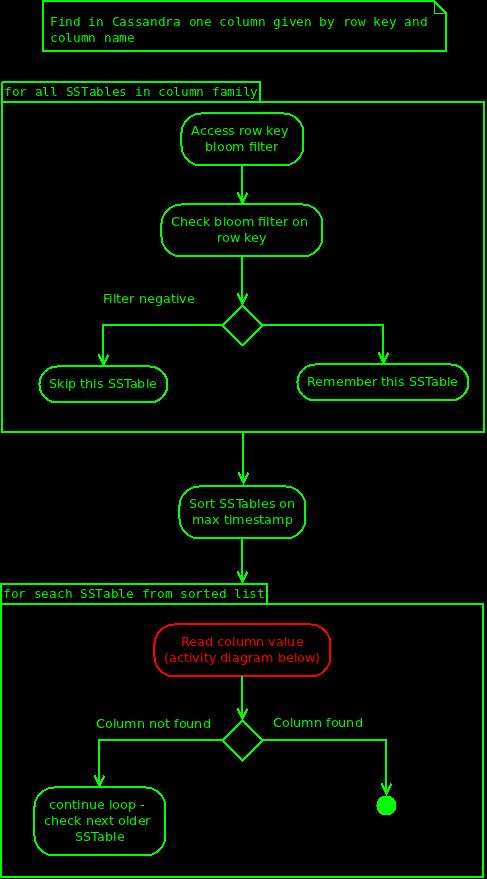
So ... Cassandra have scanned all possible SSTables within particular column family, and found those with positive bloom filter for row key. However the fact, that given SSTable contains given row, does not necessary mean, that is also contains given column. Cassandra needs to "look into SSTable" to check whenever it also contains given column. But it does not have to blindly scan all SSTables with postie bloom filter on row key. First it will sort them by last modification time (max time from metadata). Now it has to find first (youngest) SSTable which contains our column. It is still possible, that this particular column is also stored in other SSTables, but those are definitely older, and therefore not interesting. This optimization comes first with Cassandra 1.1 (CASSANDRA-2498), previous version would need to go over all SSTables.
Cassandra has found all SSTables with positive bloom filter on row key, and it has sorted them by last modification time, now it needs to find this one which finally has our column - it's time to look inside SSTable:
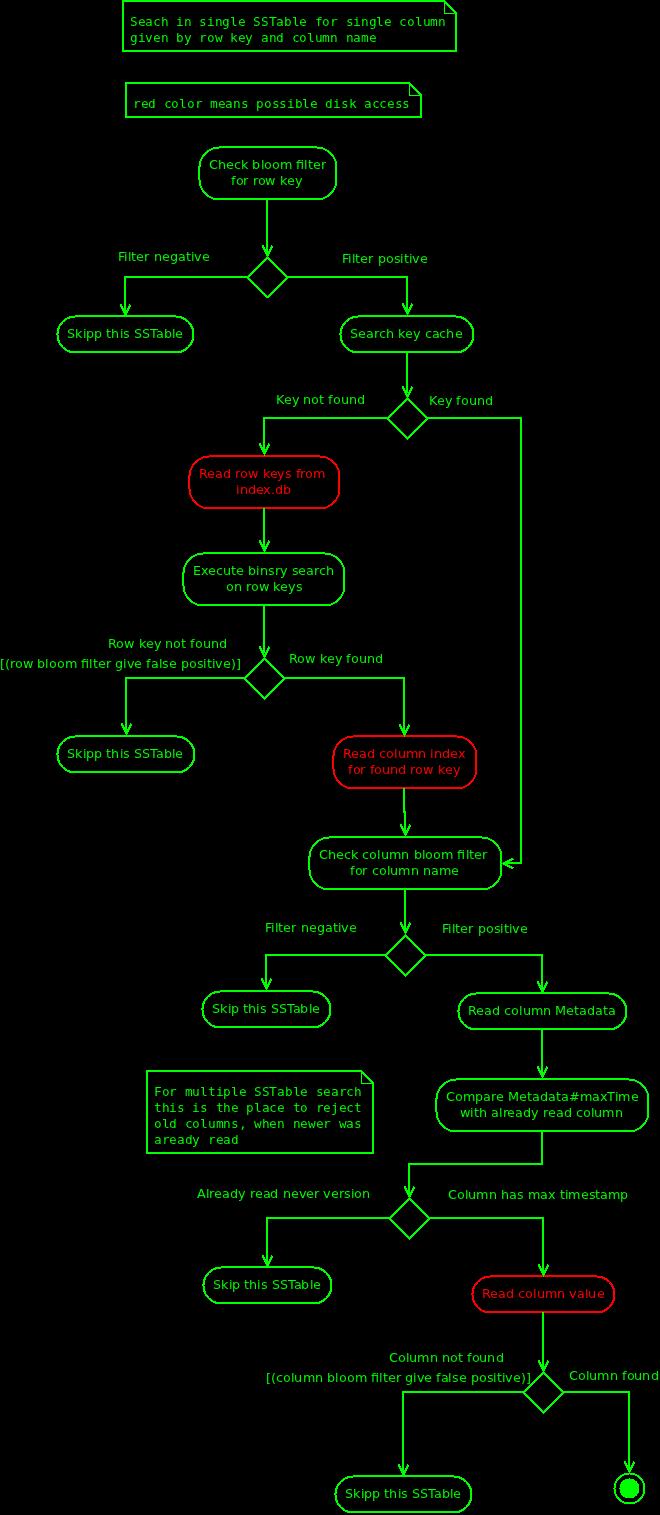
First Cassandra will read row keys from index.db, and find our row key using binary search. Found key contains offset to column index. This index has two informations: file offset for each column value, and bloom filter build on column names. Cassandra checks bloom filter on column name, if it is positive it tries to read column value - this is all.
For the record:
Conclusion
Bloom filters for rows are always in memory, accessing them is fast. But accessing column index might require extra disk reads (row keys and column index), and this pro single SSTable.
Reading can get really slow, if Cassandra needs to scan large amount of SSTables, and key cache is disabled, or not loaded yet.
Cassandra sorts all SSTables by modification time, which at least optimizes case where single column is stored in many locations. On the other hand, it might need to go over many SSTables to find "old" column. Key cache in such situation increases performance significantly.
Row keys for each SSTable are stored in separate file called index.db, during start Cassandra "goes over those files", in order to warm up. Cassandra uses memory mapped files, so there is hope, that when reading files during startup, then first access on those files will be served from memory.
Writing
We will store one column given by row key and column name.Each thrift insert request blocks until data is stored in commit log and memtable - this is all, other operations (like replication) are asynchronous. Additionally client can provide consistency level, in this case call will be blocked until required replicas respond, but asides form this, write operation can be seen as simple append.
Commit log is required, because memtable exists only in memory, in case of system crash, Cassandra would recreate memtables from commit log.
Memtable can be seen as dedicated cache created individually for each column family. It's based on ConcurrentSkipListMap - so there is no blocking on read or insert.
Memtable contains all recent inserts, and each new insert for the same key and column will overwrite existing one. Multiple updates on single column will result in multiple entries in commit log, and single entry in memtable.
Memtable will be flushed to disk, when predefined criteria are met, like maximum size, timeout, or number of mutations. Flushing memtable creates SSTable and this one is immutable, it can be simply saved to disk as sequential write.
Compaction
Compaction process will merge few SSTables into one. The idea is, to clean up deleted data, and to merge together different modifications of single column. Before compaction, a few SSTables could contain value of single column, after compaction it will be only one.Reading
We will try to find value of single column within one row.First memtable is being searched, it's like write through cache, hit on it provides the most recent data - within single instance of course, not in a whole cluster.
As the second step Cassandra will search SSTables, but only those within single column family. SSTables are grouped by column family, this is also reflected on disk, where SSTables for each column family are stored together in dedicated folder.
Each SSTable contains row bloom filter, it is build on row keys, not on column names. This gives Cassandra the possibility to quickly verify, whenever given SSTable at least contains particular row. Row bloom filers are always hold in memory, so checking them is performant. False positives are also not problem anymore, because latest Cassandra versions have improved hashing and increased size of bit masks.
So ... Cassandra have scanned all possible SSTables within particular column family, and found those with positive bloom filter for row key. However the fact, that given SSTable contains given row, does not necessary mean, that is also contains given column. Cassandra needs to "look into SSTable" to check whenever it also contains given column. But it does not have to blindly scan all SSTables with postie bloom filter on row key. First it will sort them by last modification time (max time from metadata). Now it has to find first (youngest) SSTable which contains our column. It is still possible, that this particular column is also stored in other SSTables, but those are definitely older, and therefore not interesting. This optimization comes first with Cassandra 1.1 (CASSANDRA-2498), previous version would need to go over all SSTables.
Cassandra has found all SSTables with positive bloom filter on row key, and it has sorted them by last modification time, now it needs to find this one which finally has our column - it's time to look inside SSTable:
First Cassandra will read row keys from index.db, and find our row key using binary search. Found key contains offset to column index. This index has two informations: file offset for each column value, and bloom filter build on column names. Cassandra checks bloom filter on column name, if it is positive it tries to read column value - this is all.
For the record:
- index.db contains sorted row keys, not the column index as the name would suggest - this one can be found in data.db, under dedicated offset, which is stored together witch each row key.
- SSTable has one bloom filter build on row keys. Additionally each row hat its own bloom filter, this one is build on column names. SSTable containing 100 rows will have 101 bloom filters.
- In order to find given column in SSTable Cassandra will not immediately access column index, it will first check key cache - hit will lead directly from row key to column index. In this case only one disk access is required - to read column value.
Conclusion
Bloom filters for rows are always in memory, accessing them is fast. But accessing column index might require extra disk reads (row keys and column index), and this pro single SSTable. Reading can get really slow, if Cassandra needs to scan large amount of SSTables, and key cache is disabled, or not loaded yet.
Cassandra sorts all SSTables by modification time, which at least optimizes case where single column is stored in many locations. On the other hand, it might need to go over many SSTables to find "old" column. Key cache in such situation increases performance significantly.
Row keys for each SSTable are stored in separate file called index.db, during start Cassandra "goes over those files", in order to warm up. Cassandra uses memory mapped files, so there is hope, that when reading files during startup, then first access on those files will be served from memory.
Thursday, August 2, 2012
RESTEasy Spring Integration - Tutorial Part 2 - Exeption Handling
Second part will describe exception handling in REST scope - a few design patterns and way of implementing them. I will give also some examples of anti patters - just for a contrast.
In general, JEE projects are dividing exceptions into three parts - checked, unchecked exceptions (runtime), and throwable.
The existing REST resource HelloRestService will remain almost unchanged, its methods will throw new exceptions, and those will be handled by exception mappers.
HelloRestServiceCatch in contrast will contain try-catch exception handling, so both approaches can be easily compared.
This is the updated project structure:
and this simple validation logic responsible for throwing exceptions (build into existing service):
REST resource class do not catch exceptions, they are simply declared in method signature. By default RESTEasy would convert such exception to "500 Internal Server Error", since it was not handled by application logic.
In order to handle exceptions we need to register exception mappers. Each one can handle single exception, and also its subclasses - if there is no dedicated handler for particular subclass. For example: we can register handler for Exception and it will get called for every possible exception inclusive runtimes, but we can still register handler for IncorrectLengthException (subclass of Exception), and in this handler will be called when IncorrectLengthException occurs. This was not always the case - in the older RESTEasy versions, exception mapper registered on parent class would be called for all child exceptions, so it was not possible to register exception mapper on Exception because other mappers would not be called.
RESTEasy looks for classes marked @Provider and implementing ExceptionMapper<E>, where E declares exception class which will be handled by this mapper. In the normal case, RESTEasy would scann class path, but since we are using Spring integration, it will ask Spring instead. This is the reason, why mapper classes are annotated with @Named and @Provider.
Updated REST Resource (only exceptions in method signature):
https://github.com/maciejmiklas/resteasy_spring_p2.git
In general, JEE projects are dividing exceptions into three parts - checked, unchecked exceptions (runtime), and throwable.
- Checked exceptions are visible in method signature, and therefore they must be handled by the developer. When method declares such exception, it means, that someone can possibly process this exception, and do something useful with it. For example, it can display message to the user, that entered password is incorrect, or given account was not found. It is very important to NOT overuse checked exceptions - do not define every possible event as checked exception, this will decrease method readability. When defining check exception, ask yourself always a question: it is possible to react in a special way on this particular event? Can it be handled ? And for the record - creating long entry does not count ;) Also when you notice frequent catch(Exception e){....} blocks around your code, it means, that something went wrong during design phase - people just does not care about defined exceptions, so maybe they should be runtime? I am assuming, that generic catch blocks are rear in correctly written code, if existing, they are well documented so the others can understand the reason.
- Unchecked exceptions are not visible in method signature - those are all possible events, which break current process and nothing can be done about it. In the most cases, log entry is created, monitoring framework is being notified, and GUI displays generic error message.
- Throwables shoud never be handled by developer - catch(Throwable e){....} block in not acceptable. Errors like LinkageError or OutOfMemoryError must be handled by container.
- DBConnectionError on high level business interface is definitely runtime - here we even do not notice, that database is part of our transaction - this is being encapsulated behind service interface, which as every proper high level interface hides implementation details. On the other hand, connection pool maybe can handle such exception by reestablishing connection to another DB instance - on this level DBConnectionError would be checked exception, because it is clearly connection pool responsibility to react on this error.
- Null-Pointer-Like-Exceptions are runtime in every scope - it breaks given transaction and this is all - no one will catch this exception, so it is not visible in method signature, and as usual not expected.
- AccountNotFoundException is always checked - it does not matter on which level you are. Account was not found, and therefore certain action cannot be executed, in that case developer can create missing account, or in the worst case notify user, that he actually does not exists.
- Checked exception: MessageForbidenException, it will be thrown, when hi-message begins with "jo!". REST interface in this case returns status code: "400 Bad Request" and sets response header "ERR_CODE=MESSAGE_FORBIDDEN"
- Checked exception: IncorrectLengthException, it will be thrown, when message size in not between 3 and 10 characters. REST interface in this case returns status code: "400 Bad Request" and sets response header "ERR_CODE=INCORRECT_LENGTH"
- We would like also to log all possible exceptions (runtimes) - there are several reasons for that - to create dedicated log entry, or to notify monitoring framework. In case of any exception, we would like to set status code: "500 Internal Server Error", and HTTP Header: EX_CLASS, which contains exception's class name, and message body should contain stack trace (this might be security issue for some systems - be cheerful here).
Project update
We will extend project from previous tutorial, by adding new exceptions, exception mappers, add new REST Resource: HelloRestServiceCatch.The existing REST resource HelloRestService will remain almost unchanged, its methods will throw new exceptions, and those will be handled by exception mappers.
HelloRestServiceCatch in contrast will contain try-catch exception handling, so both approaches can be easily compared.
This is the updated project structure:
and this simple validation logic responsible for throwing exceptions (build into existing service):
@Named public class HelloSpringService { public String sayTextHello(String msg) throws MessageForbidenException, IncorrectLengthException { verifyIncommingMessage(msg); return msg + "--> Hello"; } public HelloResponse sayJavaBeanHello(HelloMessage msg) throws MessageForbidenException, IncorrectLengthException { verifyIncommingMessage(msg.getMsg()); return new HelloResponse(msg.getMsg() + "--> Hello " + (msg.getGender() == Gender.MALE ? "Sir" : "Madam"), new Date()); } private void verifyIncommingMessage(String msg) throws MessageForbidenException, IncorrectLengthException { if (msg == null) { throw new IncorrectLengthException("Empty message not allowed"); } msg = msg.trim(); int msgLength = msg.length(); if (msgLength < 3 || msgLength > 10) { throw new IncorrectLengthException("Message length not between 3 and 10 characters"); } if (msg.toLowerCase().startsWith("jo!")) { throw new MessageForbidenException("Jo! is not allowed"); } } }Curl examples triggering new exceptions:
>> GET REQUEST << curl -iX POST -H "Content-Type: application/json" -d '{"msg":"Jo!","gender":"MALE"}' http://localhost:8080/resteasy_spring_p2/rest/Hello/catch/javabean HTTP/1.1 400 Bad Request Server: Apache-Coyote/1.1 ERR_CODE: MESSAGE_FORBIDDEN Content-Type: application/json Content-Length: 18 Connection: close >> RESPONSE << Jo! is not allowed
>> GET REQUEST << curl -iX POST -H "Content-Type: application/json" -d '{"msg":"Hi","gender":"MALE"}' http://localhost:8080/resteasy_spring_p2/rest/Hello/catch/javabean HTTP/1.1 400 Bad Request Server: Apache-Coyote/1.1 ERR_CODE: INCORRECT_LENGTH Content-Type: application/json Content-Length: 46 Connection: close >> RESPONSE << Message length not between 3 and 10 characters
>> GET REQUEST << curl -iX POST -H "Content-Type: application/json" -d '{"msg":"Hi","gender":"FRED"}' http://localhost:8080/resteasy_spring_p2/rest/Hello/javabean HTTP/1.1 500 Internal Server Error Server: Apache-Coyote/1.1 EX_CLASS: org.codehaus.jackson.map.JsonMappingException Content-Type: application/json Content-Length: 4689 Connection: close >> RESPONSE << Can not construct instance of org.mmiklas.resttutorial.model.Gender from String value 'FRED': value not one of declared Enum instance names.....
Traditional try-catch Approach
Traditional try-catch approach has several problems, and well .... no advantages:- Different methods throw the same exception, and have similar catch block, to handle it. This code could be extracted as separate method, but still you need to relay on developer, to call it. On the end there is no guarantee, that the same exception will be always handled in the same way. The goal of consistent error handling is, to map given exception to the same REST representation - MessageVorbidenException results always in 400.
- Catching Exception is mostly bad practice. If we define new checked exception, we also expect that it will be handled by developers in dedicated way - at the begining code should not compile, since there is no catch block for this new exception. But in case of catch(Exception e){....} code will compile and our new exception will be treated as general error, and not in a special way as expected. We might even not notice that.
@Named @Path("/Hello/catch") public class HelloRestServiceCatch { private final static Logger LOG = Logger.getAnonymousLogger(); @Inject private HelloSpringService halloService; // curl http://localhost:8080/resteasy_spring_p2/rest/Hello/catch/text?msg=Hi%20There @GET @Path("text") @Produces(MediaType.APPLICATION_FORM_URLENCODED) public Response sayTextHello(@QueryParam("msg") String msg) { try { String resp = halloService.sayTextHello(msg); return Response.ok(resp).build(); } catch (MessageForbidenException e) { return handleMessageForbidenException(e); } catch (IncorrectLengthException e) { return handleIncorrectLengthException(e); } catch (Exception e) { return handleException(e); } } // curl -X POST -H "Content-Type: application/json" -d '{"msg":"Hi There","gender":"MALE"}' // http://localhost:8080/resteasy_spring_p2/rest/Hello/catch/javabean @POST @Path("javabean") @Produces({ MediaType.APPLICATION_JSON, MediaType.APPLICATION_XML }) @Consumes({ MediaType.APPLICATION_JSON, MediaType.APPLICATION_XML }) public Response sayJavaBeanHello(HelloMessage msg) { try { HelloResponse resp = halloService.sayJavaBeanHello(msg); return Response.ok(resp).build(); } catch (MessageForbidenException e) { return handleMessageForbidenException(e); } catch (IncorrectLengthException e) { return handleIncorrectLengthException(e); } catch (Exception e) { return handleException(e); } } private Response handleException(Exception e) { LOG.log(Level.WARNING, e.getMessage(), e); return Response.status(Status.INTERNAL_SERVER_ERROR).header(Headers.EX_CLASS.name(), e.getClass().getCanonicalName()) .entity(e.getMessage() + " - " + getStackTrace(e)).build(); } private Response handleIncorrectLengthException(IncorrectLengthException e) { return Response.status(Status.BAD_REQUEST).header(Headers.ERR_CODE.name(), RespCodes.INCORRECT_LENGTH.name()).entity(e.getMessage()).build(); } private Response handleMessageForbidenException(MessageForbidenException e) { return Response.status(Status.BAD_REQUEST).header(Headers.ERR_CODE.name(), RespCodes.MESSAGE_FORBIDDEN.name()).entity(e.getMessage()).build(); } private String getStackTrace(Exception ex) { StringWriter sw = new StringWriter(); PrintWriter pw = new PrintWriter(sw, true); ex.printStackTrace(pw); return sw.getBuffer().toString(); } }
Exception Mappers
The approach with exception mappers has few nice futures:- Clan code - REST implementation is not overflowed with try-catch blocks
- No code repetition
- Centralized and automatic mapping from Java exceptions to REST representation
- Each exception will always result in the same REST response - this improves interface stability and integrity
- No Exception catch blocks - check style will be happy about that ;)
REST resource class do not catch exceptions, they are simply declared in method signature. By default RESTEasy would convert such exception to "500 Internal Server Error", since it was not handled by application logic.
In order to handle exceptions we need to register exception mappers. Each one can handle single exception, and also its subclasses - if there is no dedicated handler for particular subclass. For example: we can register handler for Exception and it will get called for every possible exception inclusive runtimes, but we can still register handler for IncorrectLengthException (subclass of Exception), and in this handler will be called when IncorrectLengthException occurs. This was not always the case - in the older RESTEasy versions, exception mapper registered on parent class would be called for all child exceptions, so it was not possible to register exception mapper on Exception because other mappers would not be called.
RESTEasy looks for classes marked @Provider and implementing ExceptionMapper<E>, where E declares exception class which will be handled by this mapper. In the normal case, RESTEasy would scann class path, but since we are using Spring integration, it will ask Spring instead. This is the reason, why mapper classes are annotated with @Named and @Provider.
Updated REST Resource (only exceptions in method signature):
@Named @Path("/Hello") public class HelloRestService { @Inject private HelloSpringService halloService; // curl http://localhost:8080/resteasy_spring_p1/rest/Hello/text?msg=Hi%20There @GET @Path("text") @Produces(MediaType.APPLICATION_FORM_URLENCODED) public Response sayTextHello(@QueryParam("msg") String msg) throws MessageForbidenException, IncorrectLengthException { String resp = halloService.sayTextHello(msg); return Response.ok(resp).build(); } // curl -X POST -H "Content-Type: application/json" -d '{"msg":"Hi There","gender":"MALE"}' // http://localhost:8080/resteasy_spring_p1/rest/Hello/javabean @POST @Path("javabean") @Produces({ MediaType.APPLICATION_JSON, MediaType.APPLICATION_XML }) @Consumes({ MediaType.APPLICATION_JSON, MediaType.APPLICATION_XML }) public Response sayJavaBeanHello(HelloMessage msg) throws MessageForbidenException, IncorrectLengthException { HelloResponse resp = halloService.sayJavaBeanHello(msg); return Response.ok(resp).build(); } }Exception mappers:
@Provider @Named public class IncorrectLengthExceptionMapper implements ExceptionMapper<IncorrectLengthException> { public Response toResponse(IncorrectLengthException e) { return Response.status(Status.BAD_REQUEST).header(Headers.ERR_CODE.name(), RespCodes.INCORRECT_LENGTH.name()).entity(e.getMessage()).build(); } }
@Provider @Named public class MessageForbidenExceptionMapper implements ExceptionMapper<MessageForbidenException> { public Response toResponse(MessageForbidenException e) { return Response.status(Status.BAD_REQUEST).header(Headers.ERR_CODE.name(), RespCodes.MESSAGE_FORBIDDEN.name()).entity(e.getMessage()).build(); } }
@Provider @Named public class UnhandledExceptionMapper implements ExceptionMapper<Exception> { private final static Logger LOG = Logger.getAnonymousLogger(); public Response toResponse(Exception e) { LOG.log(Level.WARNING, e.getMessage(), e); return Response.status(Status.INTERNAL_SERVER_ERROR). header(Headers.EX_CLASS.name(), e.getClass().getCanonicalName()). entity(e.getMessage() + " - " + getStackTrace(e)).build(); } private String getStackTrace(Exception ex) { StringWriter sw = new StringWriter(); PrintWriter pw = new PrintWriter(sw, true); ex.printStackTrace(pw); return sw.getBuffer().toString(); } }
Project Source Download
resteasy_spring_p2.ziphttps://github.com/maciejmiklas/resteasy_spring_p2.git
Subscribe to:
Posts (Atom)